



Family Axis SoftwareIntroducing the Resident Profile
· 9 min read
Looking for a smarter way to manage your parenting assessments? FamilyAxis has you covered. Our resident profile brings everything connected to a parent into one place, from placement plans and risk assessments to observations, safeguarding and reports, and our new document upload feature gets new records started in seconds.
If you've ever worked in a residential family centre, you've almost certainly experienced the frustration of trying to make a software platform designed for another purpose fit the realities of parenting assessment work. You end up logging parent details under the child's profile, trying to fit complex adult risk assessments into fields that don't make sense for them, and spending more time fighting your system than using it.
FamilyAxis was built specifically for residential family centres. That means resident (parent) profiles are not an afterthought or a workaround — they are a core part of the platform's architecture, designed around the unique demands of parenting capacity assessment.
From a resident profile, you can quickly and easily understand a parent's needs, the risks you should be aware of, and the parameters of their placement. You can add observations, record direct work sessions, stay updated on safeguarding concerns, and create reports — all without leaving the profile. And because every resident is linked to their child's profile, you have a complete, connected picture of the family at your fingertips.
This article will break down all of the main features of the resident profile, explain how to use them, and introduce our latest exciting feature, adding a resident with an existing document to help you save valuable time.
Meeting the Standards
The core function of a residential family centre is to provide robust, fair, and evidence-based assessments of parenting capacity. This isn't just good practice, it's a regulatory requirement.
Regulation 13A of the Residential Family Centres Regulations 2002 requires that "the parents' capacity to respond to the children's needs and to safeguard their welfare is monitored or assessed by a suitably qualified person," and that conclusions must be "objective and based on verifiable evidence." NMS Standard 9 reinforces this by requiring a pre-admission risk assessment and a written family placement plan completed in consultation with the placing authority.
What this means in practice is that your centre needs a structured, reliable way to hold and organise a significant amount of information about each parent — their identity, their health, the risks they may present, the plan for their assessment, and an ongoing record of observations, direct work, and safeguarding events. That is exactly what the FamilyAxis resident profile provides.
What You'll Love About the Resident Profile
A Single, Connected View of the Parent
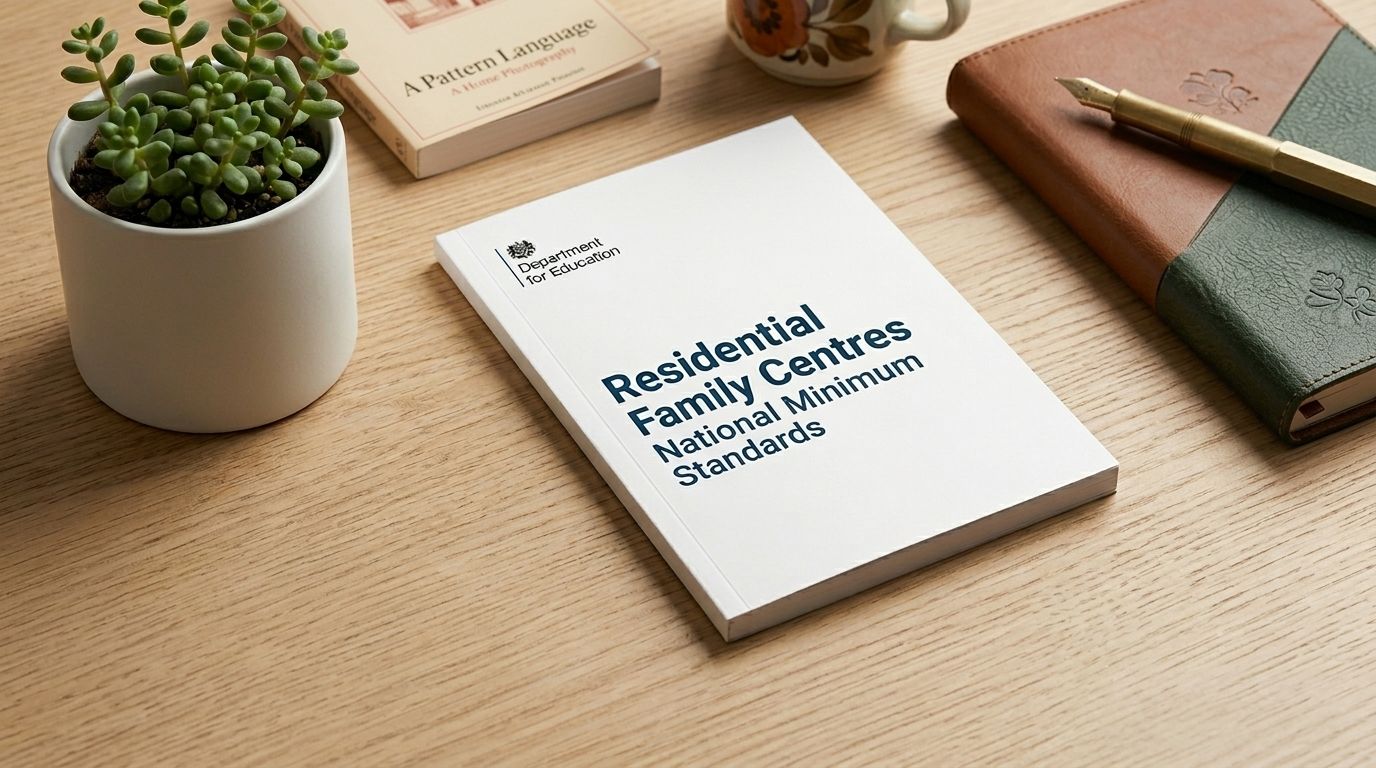
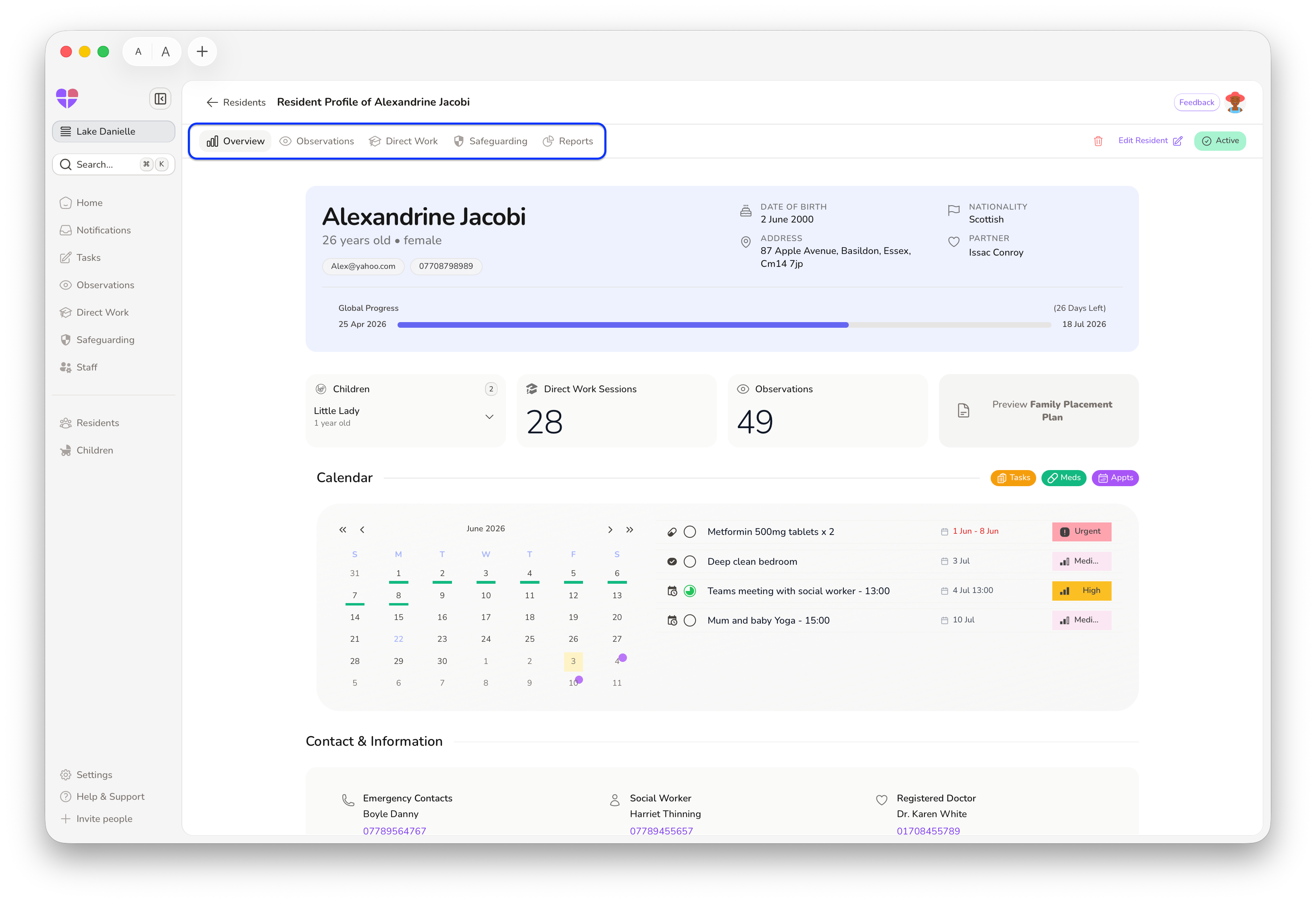
When you open a resident profile, the Overview tab is your main dashboard. It pulls together the contact, health, and placement information, alongside the resident's calendar, linked children, activity counters showing the number of observations and direct work sessions logged, and the Global Progress Bar tracking the assessment timeline.
This means that anyone on your team, whether it's a key worker arriving for a shift or a manager preparing for a review, can open a single page and immediately understand where things stand with this parent. No digging through multiple screens. No cross-referencing. Just a clear, at-a-glance summary.
Managing Information: The 5 Edit Tabs
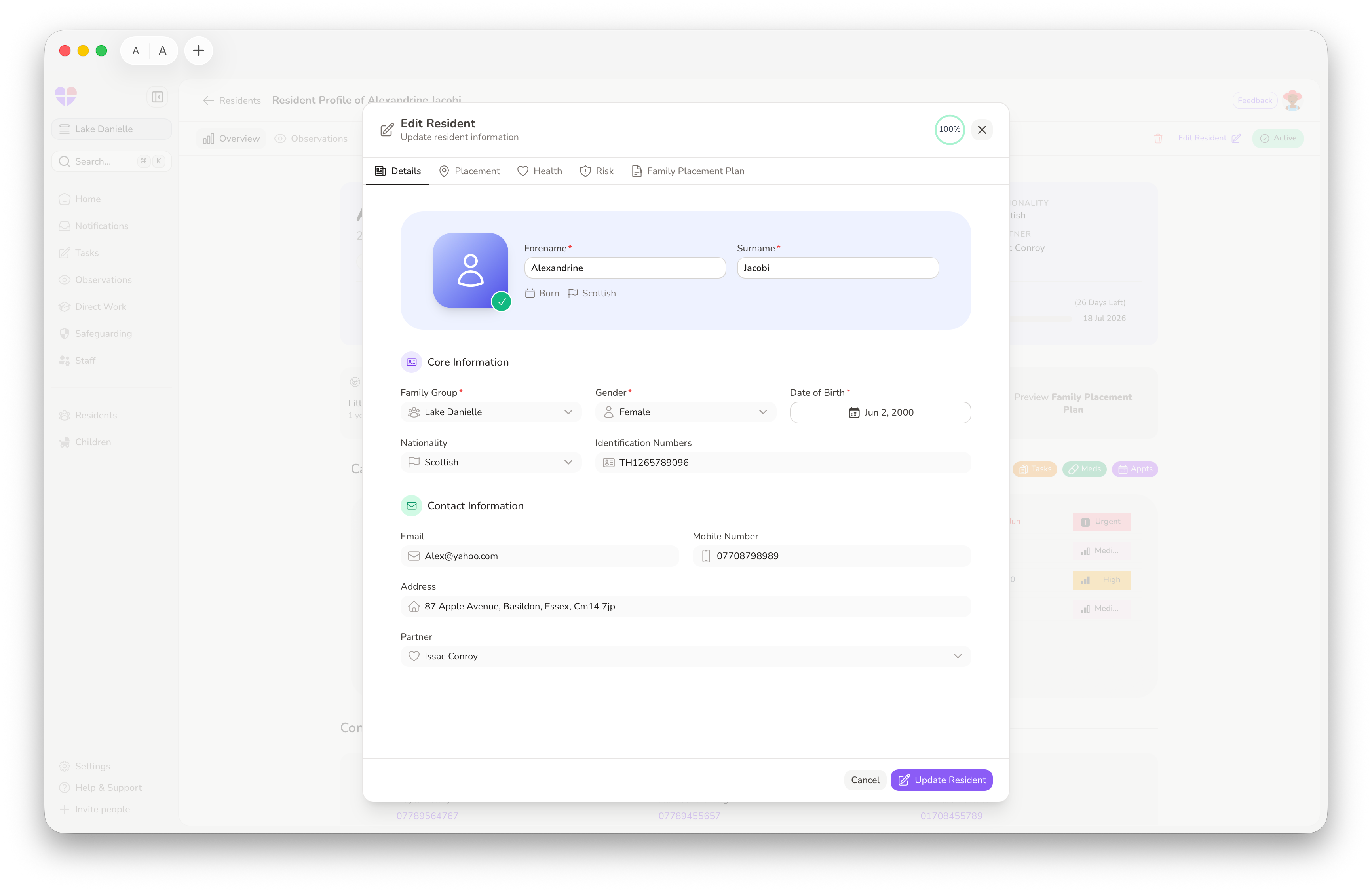
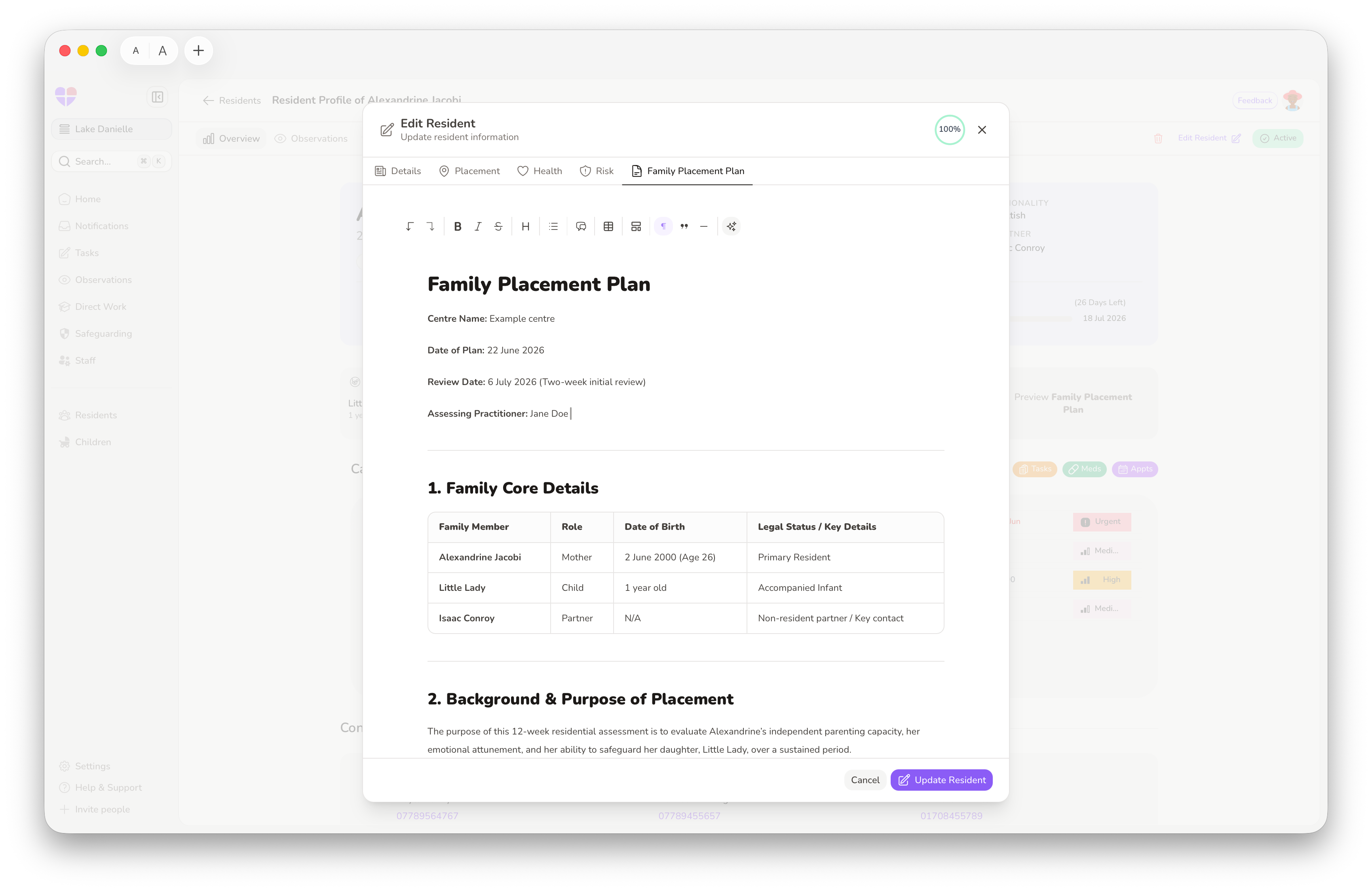
Click Edit Resident in the top-right corner, and you'll access five dedicated areas that build the resident's record. The fields in the first three tabs automatically populate the Overview section on the main profile, so keeping them updated ensures the dashboard is always accurate.
Details
Manage basic identity information; name, date of birth, nationality, and gender. You can also link a partner here for joint or couples assessments, which is essential when both parents are being assessed and their information needs to be cross-referenced for reporting and reviews.
Placement
Set arrival dates, expected duration, room allocation, and key workers. Critically, this tab also holds the safety information that your team needs to know from day one: supervision details, contact permissions, and any active court orders. This aligns directly with NMS Standard 9's requirement that the family placement plan specifies the level of supervision and protection to be provided.
Health
Record GP and Social Worker details alongside clinical information such as medical conditions, allergies, and mental wellbeing. This ensures that health-critical information is captured and surfaced where it matters — supporting your obligations under Regulation 10 to promote the physical, mental, and emotional health of residents.
Risk
A dedicated area for the Initial Risk Assessment. You can insert a pre-defined template here to ensure consistency across your organisation. This directly supports the requirement under Regulation 13(1)(c) for the placement plan to include:
"an assessment of the risks, if any, which a resident at the residential family centre may present to their own health, safety and welfare or that of other residents or staff at the centre."
Family Placement Plan
A dedicated text editor for the placement plan itself. Like the Risk tab, you can use templates to quickly populate and edit this for each resident. This is where the objectives, intended outcomes, and assessment methodology are set out, the document that drives the entire placement.
Profile Tabs & Casework
The tabs at the top of the profile page act as filters, showing only the data belonging to this specific resident. These are not the global lists, they are focused, resident-specific views:
- Overview: Your main dashboard, as described above.
- Observations & Direct Work: A full chronological history of logs and support sessions for this resident, complete with built-in tracking tools and visual progress insights.
- Safeguarding: Safeguarding action plans and incident/accident entries specific to this resident, ensuring that safeguarding concerns are tracked individually and remain visible alongside the broader care record.
- Reports: Access the Report Creator or view finalised documents, pulling from the full body of data captured across the resident's profile.
Navigation Shortcuts
FamilyAxis is designed to let you move between family members and documents quickly, so you spend less time clicking and more time focusing on the families:
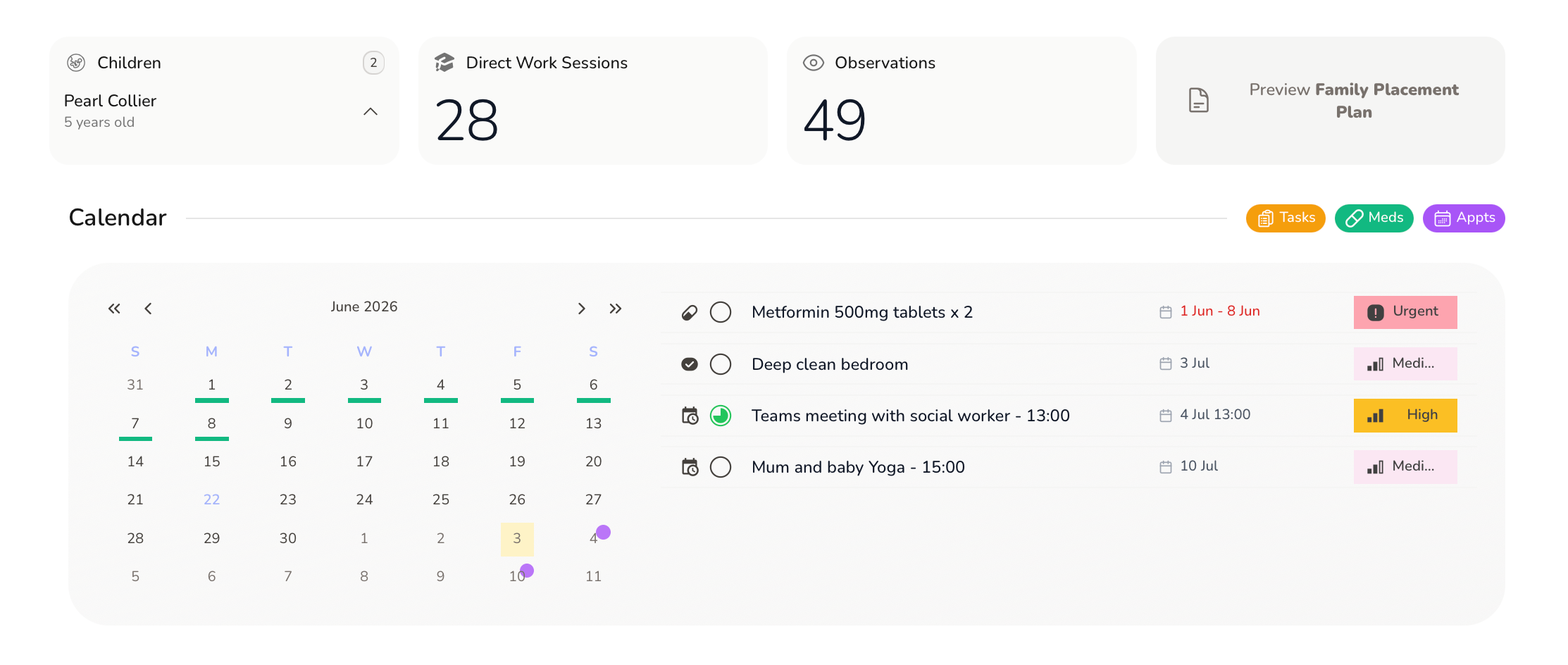
- Linked Children: Any children associated with the resident are listed directly on the profile. Clicking a child's name takes you straight to their Child Profile, including their specific notes and Life Story features. This makes it easy to review the full family picture without losing your place, essential when the welfare of the child must always be paramount.
- Placement Plan Preview: You don't need to enter Edit mode just to read the plan. Simply click the Family Placement Plan link on the profile page to open a clean, read-only preview. Quick access for handovers, reviews, or when a placing authority requests an update.
The Resident Schedule (Calendar)
The schedule displays all events; Tasks, Medications, and Appointments — linked to this resident, giving you a unified timeline of everything coming up.
- Add New Events: Click Add new event to schedule a task. This takes you to the Tasks page; once saved, the event automatically appears on this resident's calendar.
- Filtering: Use the coloured toggles to show or hide different event types. For example, during a medication review, you might hide Tasks and Appointments to focus solely on the medication schedule.
- Finding the Button: If you can't see the Add new event button, click the Tasks/Meds/Appts filter toggles to deselect them. Clearing the active events from the calendar view will reveal the button.
Our Latest Feature: Adding a Resident with an Existing Document
We're excited to introduce a feature that we know will save teams significant time during intake.
When creating a new resident, you can now upload an existing document — such as a referral form, assessment summary, or family placement plan and FamilyAxis will automatically extract and populate the relevant fields in the resident's profile.
Anyone who has worked in a residential family centre knows the feeling: a new family is arriving, you've received a detailed referral document from the placing authority, and you're faced with the prospect of manually re-keying all of that information into your system. It's tedious, it's time-consuming, and it's exactly the kind of administrative friction that takes time away from the people who matter most.
Here's how it works:
- Click Residents > Add Resident +
- Click “Add Using Document” to upload your existing document (e.g., a PDF containing the resident's details).
- FamilyAxis reads the document and auto-fills fields such as name, date of birth, health information, and other key details.
- Review the populated fields, make any corrections or additions, and save.
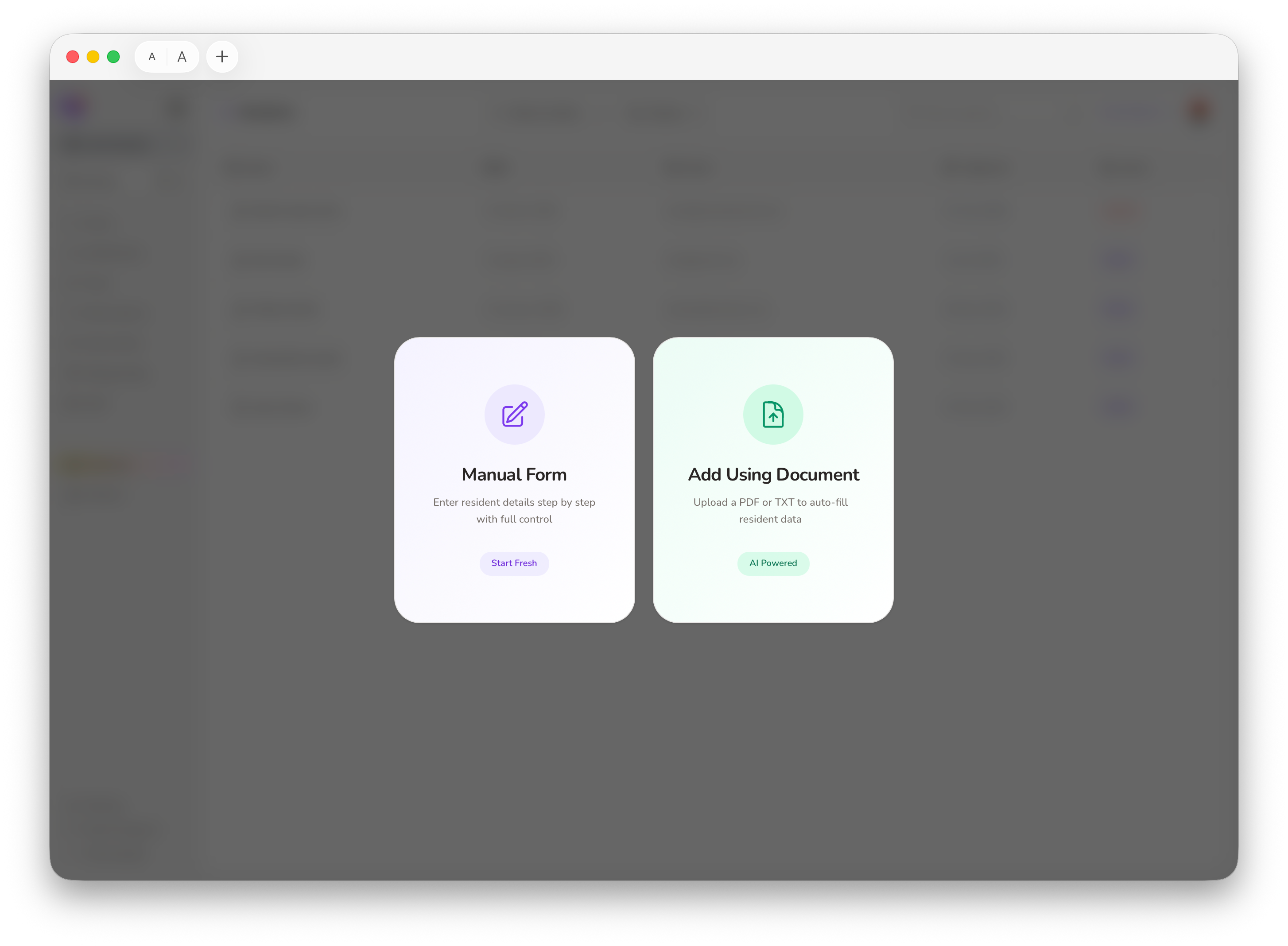
It's that simple. The information that already exists in another document is now in your system, saving you from having to type out the exact same details twice.
Tip: Always review auto-filled information carefully before saving. While the document upload feature is designed to be accurate, a quick human check ensures your records are correct from the start. This is especially important given Regulation 13A's requirement that assessment evidence is "objective and based on verifiable evidence" — accuracy at the point of entry sets the standard for everything that follows.
More Time for What Matters Most
Effective residential family assessment requires more than just good intentions. It requires a system that truly understands the unique demands of your day-to-day work; one that safely holds the full story of a family's journey in a structured, accessible, and compliant way.
The FamilyAxis resident profile does exactly that. It brings together identity, placement details, health records, risk management, and the family placement plan into a single space. By connecting these to ongoing observations, direct work, safeguarding logs, and reports, it seamlessly links the entire picture to the child's profile so that the family's story is always complete.
And with our new document upload feature, getting a new resident's record started is faster and more intuitive than ever. By removing the burden of repetitive paperwork, your team is left with far more time for what matters most: sitting face-to-face with parents and supporting families when they need it most.
Sources
- Department for Education. (2013). Residential Family Centres National Minimum Standards, Principal Standard and Standard 9. In assets.publishing.service.gov.uk. Retrieved May 13, 2026, from https://assets.publishing.service.gov.uk/media/5a7574c7ed915d731495a184/2013_Residential_Family_Centres_NMS.pdf
- The Residential Family Centres Regulations 2002, Regulation 10 (Health and welfare of residents). Retrieved May 13, 2026, from https://www.legislation.gov.uk/uksi/2002/3213/regulation/10
- The Residential Family Centres Regulations 2002, Regulation 13 (Placements). Retrieved May 13, 2026, from https://www.legislation.gov.uk/uksi/2002/3213/regulation/13
- The Residential Family Centres Regulations 2002, Regulation 13A (Assessments). Retrieved May 13, 2026, from https://www.legislation.gov.uk/uksi/2002/3213/regulation/13A